Boxes and Frames

|
Main page |
|
Index |
| English FAQ |
| Documentation |
|
Software
|
|
CTAN Search CTAN: Main Server |
|
Statistics |
|
 |
|
 |
| More Books |
Pagebreak inside a framed Shadow Box
You need the packages framed and
fancybox.



Shadow Boxes
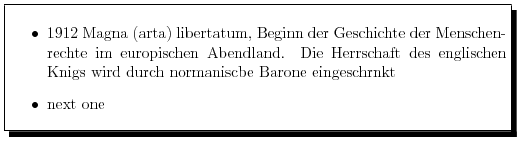
for a default solution look at package hvfloat. Is the image/table larger than one page try the following. It is a special one for images/tables which are higher than one page. You need package framed.
In the preamble:
\usepackage{framed}
\makeatletter
\def\xcaption#1{%
\fs@boxed%
\def\@captype{algorithm}%
\caption{#1}%
\unvbox\@floatcapt\par}
\makeatother
and in the text use:
\begin{framed}
 .....
 .....
\end{framed}
\xcaption{the caption}
Boxing/Framing Text
Boxing a text over the whole columnwidth is very easy:
- in a textline: \fbox{myText}
- over the whole column or smaller by choosing a specific boxwidth instead of \columnwidth, e.g. 5cm or 0.5\columnwidth
\fbox{\parbox{\columnwidth}{
..the text the text the text
}}
If you want framed text over more than one page choose package framed, and than in text\begin{framed} ... the text ... \end{framed}
Colored Boxes/Frames
A colored box is possible with package color and
command \colorbox{mycolor} instead of command \fbox
Boxing over more than one column
Boxing over two or more colums is possible when you replace \columnwidth with \textwidth,
but remember, that LaTeX reservs space only for the actual
column. Therefore this makes sense in headers or footers, which have always \textwidth-format,
which is unindependent from the value of the columns.
A frame around the whole page is possible with packages fancxbox and pstricks. Write in LaTeX-preamble
\usepackage{pstricks}
\usepackage{fancybox}
\newcommand\BoxWidth{\textwidth}
\newcommand\BoxHeight{\textheight}
\newcommand\LowerLeftX{-10}
\newcommand\LowerLeftY{-250}
The values for LowerLeft corresponds to the upper left textarea. These values are right for the komascript-style. Change them for other classes.
In Text write anywhere at the page:
\begin{picture}(0,0)
\unitlength=1mm
\put(\LowerLeftX,\LowerLeftY){%
  \ovalbox{\rule{0pt}{1.075\BoxHeight}\hspace{1.05\BoxWidth}%
  }%
}
\end{picture}
the best way to put a frame around the whole page is to
export the dvi output to a ps-file and than
psnup -b20 -d input.ps output.ps |