Tables/Arrays

|
Main page |
|
Index |
| English FAQ |
| Documentation |
|
Software
|
|
CTAN Search CTAN: Main Server |
|
Statistics |
|
 |
|
 |
| More Books |
\tabcolsep / \arraycolsep.
One time before and one time after the optional vertical line. This additional space can
be overwritten with the @{} operator. Its argument can hold any command and can
be empty, which is the same than a zero width.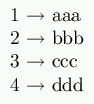


\usepackage{ltablex}\keepXColumns
For the columns which widths should be set by the package choose the column type
X.
In case of a very small last column choose
\newcolumntype{Y}{>{\RaggedRight}X}
Remember that in those columns \\ ends the column line not the tabular line, which is
possible with \tabularnewline.
| Dynamical Tables | Example | |
|---|---|---|
Creating Tables with a command like \dyntable{5}
is possible with the following stuff in the preamble:
\makeatletter
\newcommand*{\InitToks}{\toks@={}}
\newcommand{\AddToks}[1]{%
  \toks@=\expandafter{\the\toks@ #1}}
\newcommand*{\PrintToks}{\the\toks@}

\newcommand*{\dyntable}[1]{%
 \begingroup
 \InitToks
 \AddToks{\begin{tabular}{c}}%
 \count@=0 %
 \loop\ifnum\count@<#1\relax
  \advance\count@ by 1 %
  \expandafter\AddToks\expandafter{%
   \the\count@. Row \tabularnewline}%
 \repeat
 \AddToks{\end{tabular}}%
 \PrintToks
 \endgroup}
\makeatother
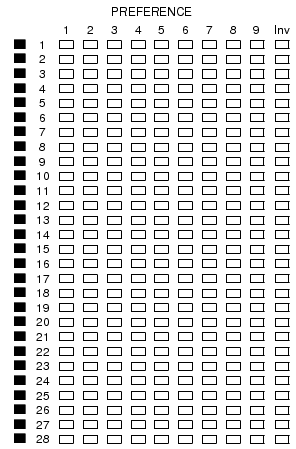
It produces the output:
1. Row 2. Row 3. Row 4. Row 5. Row |
|
|
|
|
$\tabfrac{...}{...}$ when
writing math fractions in tables.
\newcommand{\tabfrac}[2]{%
	\setlength{\fboxrule}{0pt}%
	\fbox{$\frac{#1}{#2}$}%
}
This writes a fbox without a rule but with the fboxsep. For another
example look here.
p{..} columns which are left-, rightaligned or centered, then a
\\ at the end of the row ends the textline
but not the tabularline. In this case still use \tabularnewline. F.ex.:
\renewcommand{\arraystretch}{1.5}
You can choose any other factor for the spacing.
For eqnarray (also all amsmath special environments) use
\addtolength{\jot}{5pt}
\addtolength{\tabcolsep}{-1mm}
\setlength{\tabcolsep}{3mm}
The values are only examples. With the first one you are able to reset the value behind a
table with
the positive value or viceversa.
it's also possible to turn off the separation when you insert as an argument
@{}c|c@{}
(as an example for a 2*2 table with no borders on the left and the right)
On the other hand you can insert any character as a separation, e.g. a "=". The following
code defines this character as column separator and defines a macro specialLine
which has no separator:
\begin{tabular}{@{}c@{}}.
Header/Footer and tables
It is possible to put tables in the header or footer. For example a table in the header.
In Latex preamble
\usepackage{fancyhdr}
In Latex Preamble or in the text:
\newcommand\myTable{%
\begin{tabular}{|c|c|}\hline
a & b \\\hline
c & d\\\hline
\end{tabular}%
}
\fancyhead[LE,LO]{\myTable\hfill\thepage}
gives the following table in the header
----- |a|b| |c|d| ----- |
\scriptsizeor any other fontsize. Just behind the table (outside)
\normalsizeOr alternative when you want all tables with the font size \tiny
\addtocounter{footnote}{-(n-1)}
\footnotetext{... the footnotetext ...}
\stepcounter{footnote}\footnotetext{... the next footnotetext ...}
...
n is the number of footnotes in your table, e.g. 3, than you have to write \addtocounter{footnote}{-2}.This command is not necessary if there is only one footnote.
\renewcommand\arraystretch{MyValue}% (MyValue=1.0 is for standard spacing)
Different height for single rows\newlength{\myVSpace}% the height of the box
\setlength{\myVSpace}{1ex}% the default,
\newcommand\xstrut{\raisebox{-.5\myVSpace}% symmetric behaviour,
{\rule{0pt}{\myVSpace}}%
} and than once in every table- or arrayline \xstrut
\xstrut defines an unvisible box with the specific height. You can change the height with
\addtolength{\myVSpace}{1cm}
Automatic Lineheight
With package tabls.